Every developer, from novice to seasoned engineer, has at least one “cheat sheet for coding” tucked away in a notebook, a browser tab, or a PDF. Those quick reference guides promise to save time, but often they become the very source of recurring errors when used without context. In this editorial, we examine the most common pitfalls and offer refined alternatives that keep your code clean, efficient, and maintainable.
Why Relying on a Generic Cheat Sheet Can Backfire
A well‑crafted cheat sheet condenses syntax, functions, and shortcuts into a single glance. However, when the sheet is generic—covering dozens of languages with minimal depth—developers may copy snippets without understanding underlying principles. This leads to hard‑to‑debug bugs, security holes, and performance regressions. The key is to pair the cheat sheet’s brevity with a solid grasp of the concepts it summarizes.
Common Mistakes Highlighted in Popular Cheat Sheets
- Overusing Wildcards in Imports: Importing an entire module (e.g.,
from math import *) clutters the namespace and can mask name collisions. - Hard‑coding Paths: Using absolute file paths makes code brittle across environments.
- Neglecting Error Handling: Skipping try/except blocks for I/O or network calls turns silent failures into catastrophic crashes.
- Ignoring Code Formatting: A cheat sheet that omits style conventions (PEP 8 for Python, ESLint rules for JavaScript) encourages inconsistent formatting, which hampers readability.
Each of these pitfalls is easy to avoid when you replace the quick‑fix with a deliberate, context‑aware choice.
Smarter Alternatives: Refined Practices to Pair With Your Cheat Sheet
Below are concrete replacements that keep your code both fast and robust.
Selective Imports Over Wildcards
Instead of from module import *, list only the symbols you need:
from datetime import datetime, date
This reduces namespace pollution and improves readability. Most modern IDEs can auto‑import the exact names you use.
Relative and Environment‑Aware Paths
Use os.path.join or Pathlib to build file paths dynamically:
from pathlib import Path

config_path = Path(__file__).resolve().parents[1] / 'config.yml'
By referencing __file__, the path adapts to the script’s location, eliminating hard‑coded directories.
Explicit Error Handling
Wrap critical operations in try/except blocks and log meaningful messages:
try:
    result = expensive_api_call()
except ConnectionError as e:
    logger.error(f'API call failed: {e}')
    raise
Graceful degradation or retry logic can be added, ensuring your application remains resilient.
Adopting a Linter and Formatter
Integrate a linter (e.g., flake8 for Python) and an auto‑formatter (e.g., black) into your CI pipeline. This enforces style rules automatically, freeing you from manual formatting concerns.
Cheat Sheet For Excel Test at Arthur Poulsen Blog
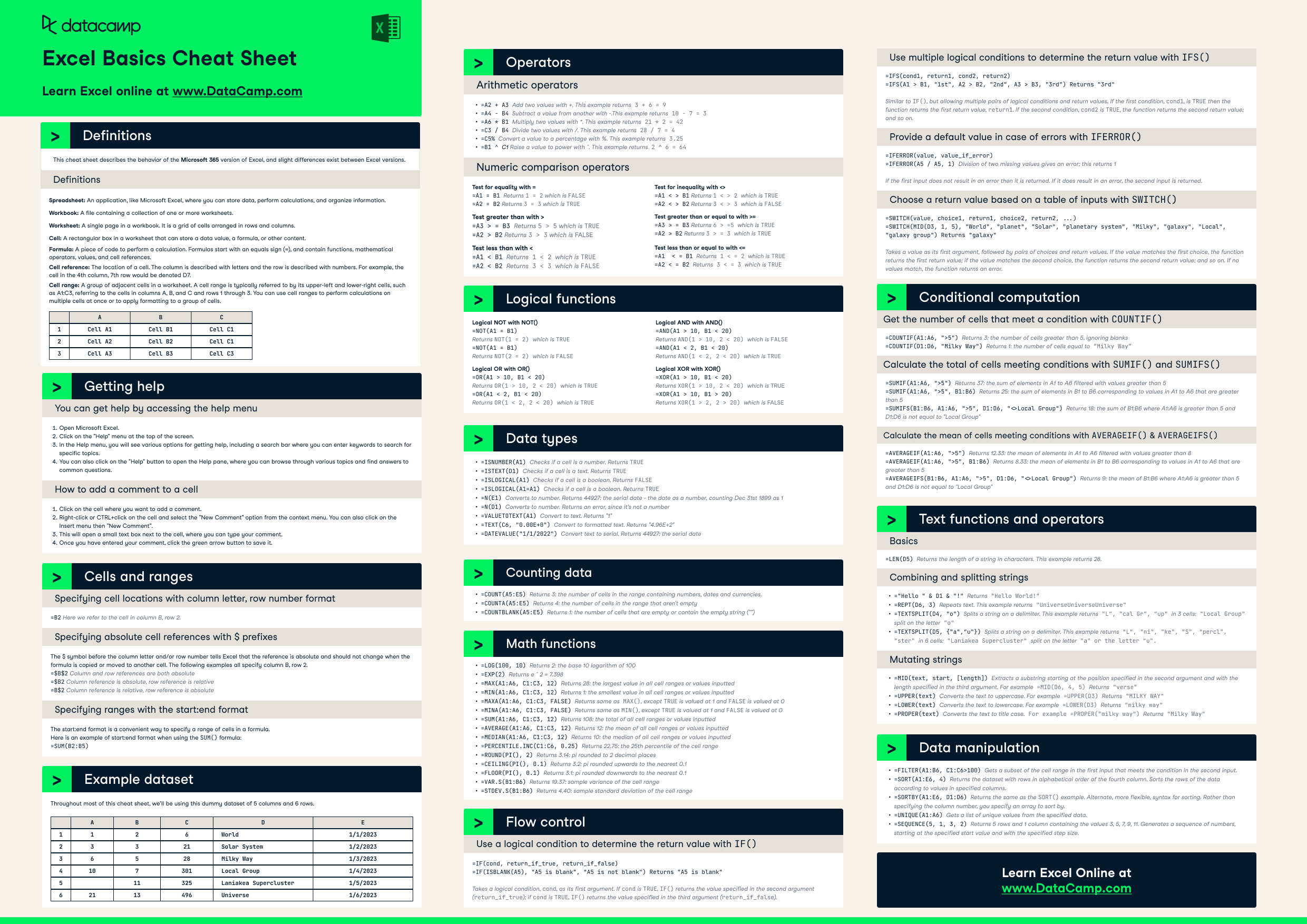
The visual reference above, sourced from Arthur Poulsen’s blog, condenses key Excel functions, shortcuts, and conditional formatting rules into a single image. While not a traditional coding cheat sheet, it exemplifies how a focused, domain‑specific guide can reduce errors and accelerate workflow. When applying this lesson to software development, focus your cheat sheet on a single language or framework, and supplement it with links to deeper resources.
Conclusion: The Balanced Cheat Sheet
A cheat sheet for coding should serve as a catalyst for better practices, not a crutch that encourages sloppy shortcuts. By identifying common mistakes—wildcard imports, hard‑coded paths, neglected error handling, and inconsistent formatting—you can replace them with targeted, context‑sensitive alternatives. Pair these refined habits with a concise, well‑organized cheat sheet that references your specific language, libraries, and environment, and you’ll maintain code quality while enjoying the speed of a quick reference guide.
Every developer, from novice to seasoned engineer, has at least one “cheat sheet for coding” tucked away in a notebook, a browser tab, or a PDF. Those quick reference guides promise to save time, but often they become the very source of recurring errors when used without context. In this editorial, we examine the most common pitfalls and offer refined alternatives that keep your code clean, efficient, and maintainable.
Why Relying on a Generic Cheat Sheet Can Backfire
A well‑crafted cheat sheet condenses syntax, functions, and shortcuts into a single glance. However, when the sheet is generic—covering dozens of languages with minimal depth—developers may copy snippets without understanding underlying principles. This leads to hard‑to‑debug bugs, security holes, and performance regressions. The key is to pair the cheat sheet’s brevity with a solid grasp of the concepts it summarizes.
Common Mistakes Highlighted in Popular Cheat Sheets
- Overusing Wildcards in Imports: Importing an entire module (e.g.,
from math import *) clutters the namespace and can mask name collisions. - Hard‑coding Paths: Using absolute file paths makes code brittle across environments.
- Neglecting Error Handling: Skipping try/except blocks for I/O or network calls turns silent failures into catastrophic crashes.
- Ignoring Code Formatting: A cheat sheet that omits style conventions (PEP 8 for Python, ESLint rules for JavaScript) encourages inconsistent formatting, which hampers readability.
Each of these pitfalls is easy to avoid when you replace the quick‑fix with a deliberate, context‑aware choice.
Smarter Alternatives: Refined Practices to Pair With Your Cheat Sheet
Below are concrete replacements that keep your code both fast and robust.
Selective Imports Over Wildcards
Instead of from module import *, list only the symbols you need:
from datetime import datetime, date
This reduces namespace pollution and improves readability. Most modern IDEs can auto‑import the exact names you use.
Relative and Environment‑Aware Paths
Use os.path.join or Pathlib to build file paths dynamically:
from pathlib import Path

config_path = Path(__file__).resolve().parents[1] / 'config.yml'
By referencing __file__, the path adapts to the script’s location, eliminating hard‑coded directories.
Explicit Error Handling
Wrap critical operations in try/except blocks and log meaningful messages:
try:
    result = expensive_api_call()
except ConnectionError as e:
    logger.error(f'API call failed: {e}')
    raise
Graceful degradation or retry logic can be added, ensuring your application remains resilient.
Adopting a Linter and Formatter
Integrate a linter (e.g., flake8 for Python) and an auto‑formatter (e.g., black) into your CI pipeline. This enforces style rules automatically, freeing you from manual formatting concerns.
Cheat Sheet For Excel Test at Arthur Poulsen Blog
The visual reference above, sourced from Arthur Poulsen’s blog, condenses key Excel functions, shortcuts, and conditional formatting rules into a single image. While not a traditional coding cheat sheet, it exemplifies how a focused, domain‑specific guide can reduce errors and accelerate workflow. When applying this lesson to software development, focus your cheat sheet on a single language or framework, and supplement it with links to deeper resources.
Conclusion: The Balanced Cheat Sheet
A cheat sheet for coding should serve as a catalyst for better practices, not a crutch that encourages sloppy shortcuts. By identifying common mistakes—wildcard imports, hard‑coded paths, neglected error handling, and inconsistent formatting—you can replace them with targeted, context‑sensitive alternatives. Pair these refined habits with a concise, well‑organized cheat sheet that references your specific language, libraries, and environment, and you’ll maintain code quality while enjoying the speed of a quick reference guide.
